Arrowtrack Solutions Software Solutions for Your Business
How TaskCheck Works
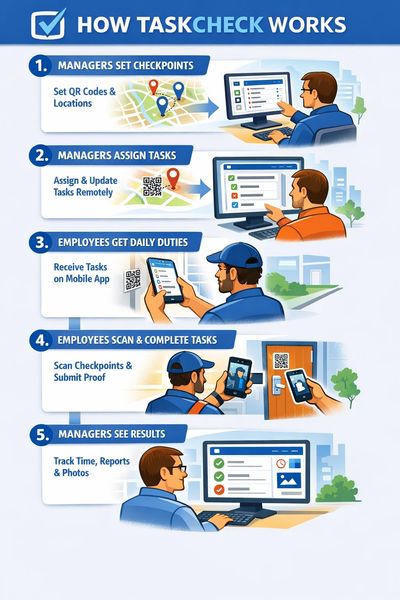
TaskCheck simplifies field operations by connecting managers and employees through structured checkpoints and digital task management. The system allows supervisors to assign work, monitor activity, and verify completion across multiple locations in real time.
1. Managers Set Checkpoints
Managers begin by placing digital checkpoints at important locations throughout a property or worksite. These checkpoints can be associated with QR codes or GPS locations and represent areas where inspections, patrols, or tasks must be completed. Common examples include entrances, equipment rooms, parking areas, gates, or building interiors.
2. Managers Assign Tasks
Once checkpoints are created, managers assign specific duties to each location through the TaskCheck dashboard. Tasks can include inspections, security patrol checks, maintenance verification, or property walkthroughs. If operational needs change, managers can update these tasks remotely without needing to replace QR codes or modify anything in the field.
3. Employees Receive Their Daily Duties
When employees begin their shift, the TaskCheck mobile application provides a clear list of their assigned responsibilities. The app shows their route, checkpoints, and the tasks that must be completed at each location. This ensures employees always know what needs to be done and where they need to go.
4. Employees Complete Tasks at Each Location
At each checkpoint, employees scan the QR code or verify their GPS location using the TaskCheck app. The system displays the required tasks for that location, allowing the employee to complete them and submit confirmation. Workers can include notes, status updates, or photos to document their work and report any issues they encounter.
5. Managers Monitor Results in Real Time
As tasks are completed, the TaskCheck dashboard updates instantly. Managers can see which checkpoints have been visited, when employees checked in, and what results were reported. This real-time visibility gives supervisors the ability to verify work, respond to issues quickly, and maintain consistent operational standards.
Welcome to Arrowtrack Solutions Software Company
TaskCheck vs Traditional Patrol Systems
Many organizations still rely on traditional patrol systems such as paper logs, radio check-ins, or outdated guard tour equipment to manage their field teams. While these methods were once common, they often leave managers with limited visibility into what is actually happening in the field. Paper reports can be filled out after a shift, patrols may be skipped, and instructions can become unclear when employees work across multiple locations. Without reliable documentation, supervisors are often forced to rely on trust rather than verified activity.
Traditional systems also make it difficult to adapt when operations change. Updating tasks, adding checkpoints, or changing patrol instructions often requires printing new procedures or physically modifying checkpoint devices in the field. This process slows operations and increases the risk that inspections or duties will be missed.
TaskCheck modernizes this process by giving managers a digital way to manage checkpoints, tasks, and field activity. Managers can place checkpoints at important locations and assign specific duties to each one. When employees arrive at a checkpoint, they simply scan it using the TaskCheck mobile application. The system automatically records the time, location, and task completion, while allowing workers to submit notes or photos as proof of work.
Unlike traditional patrol systems, TaskCheck allows managers to update tasks remotely without replacing QR codes or changing equipment in the field. Supervisors can also monitor activity in real time, providing clear visibility into which locations have been visited and which tasks have been completed.
For organizations managing security patrols, property inspections, or facility operations, TaskCheck replaces guesswork with verified records. Every checkpoint, task, and report is documented, giving managers confidence that work is being completed properly and consistently.